Với sự ra đời của Motorola Droid và gần đây là Google Nexus One, đó là bằng chứng cho một tương lai đầy hấp dẫn của Google Android năm 2010. Nền Android đã có thâm niên 2 năm và mới đây đã chuyển sang phiên bản 2.1.
Đặc biệt với sự ra đời của Nexus One là điện thoại với phần cứng, phần mềm tốt hớn và gia tăng những phần mềm tiện ích cho người dùng.
Sau đây là những tiên đoán về những gì sẽ diễn ra với Google Android trong năm 2010
1. Nhiều thiết bị điện thoại cho Google AndroidHiển nhiên như chúng ta đã biết ngoài HTC, SamSung, LG, Motorola đã ra đời những sản phầm với hệ điều hành Android. Trong năm nay, sẽ có nhiều hãng khác sẽ sử dụng nền Android như IBM,...

HTC đầu tiên cho ra đời G1 và G2, và không thể quên gần đây họ cho ra đời Hero và Droid Eris. Nhìn chung HTC đã cho thấy họ là một tập đoàn lớn trong thiết kế smart phone. Mặc dù tồn tại những lỗi với G1 Dream nhưng họ cũng đút kết những kinh nghiệm và những thư viện khổng lồ để phát triển dòng sản phẩm của chính họ trên Android Platform. Theo tôi trong năm tới HTC có thể sẽ khai thác đội ngũ lập trình viên ở nước thứ 3 như Việt Nam chúng ta. Motorola cũng là một đối thủ đáng cạnh tranh với HTC với Droid (mặc dù vẫn còn những hạn chế).
Tại thời điểm này, tương lại của thị trường di động Android sẽ phát triển hơn nhiều. Theo Wikipedia's hiện tại danh sách phát triển điện thoại Android là những nhà sản xuất vô danh nhưng chúng ta sẽ thấy nhưng thông báo của những hãng lớn về Android trong một vài tháng tới.
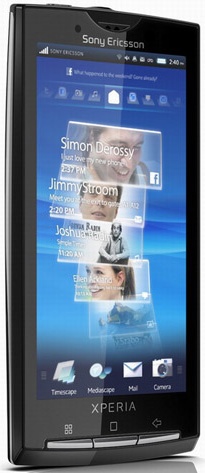
Và gần đây chúng ta cũng nghe đến Sony Ericsson's XPERIA X10, với 1Ghz bộ xử lý, 8MP camera và mà hình 4 inch. Tất cả là tốt hơn với Droid, và nó chắc rằng dấu hiệu sáng tạo đang đến với platfrom.
T-Mobile được chúng ta biết đến với G2 với bàn phím được trang bị hơn Cliq. Spint đã có ở Hero. Sự kiện AT&T với sự lớn mạnh của thiết bị cầm tay Dell.
2. Phát triển Ứng dụng bùng nổ, và vượt qua số ứng dụng iPhoneThật khó để thấy thị trường Android sẽ có nhiều ứng dụng trong năm 2010. Những gì đã đưa tôi khẳng định họ có tiềm năng lớn mạnh như vậy? Chúng ta sẽ thấy rằng tương lai về nghiệp dư và độc lập phát triển cho Android, nhưng tôi cũng thấy nhiều release từ những công ty phần mềm lớn và nhiều trao đổi của các ứng dụng iPhone phổ biến.
Droid và Nexus One là minh chứng rõ ràng với nhiều nhà phát triển có tên tuổi đã đi vào khai thác lĩnh vực Android platform.
3. Android sẽ trình làng nhiều thiết bị khác Một thuận lợi của Android là nó không giới hạn trong cellphone. Google đã tạo ra một hệ điều hành lightweight mà nó có thể vận hành tốt trên các thiết bị khác. Chúng ta đã thấy Anroid trên Archos 5 portable media, cũng như Barnes and Noble Nook ebook Reader. Trong năm 2010 chúng ta sẽ thấy những netbooks (Acer đã có kết hoạch) và tôi sẽ không ngạc nhiên khi thấy trên internet những thiết bị đó.
4. Nhiều uyển chuyển và ổn định trên Android OSLần nữa, một vấn đề dường như rõ ràng, một điểm đáng lưu ý: 2010 sẽ là năm Android trường thành từ những phần khởi đầu không mấy khả quan. Android 2.1 đã ra đời trông tốt hơn nhiều so với những phiên bản trước nhưng cũng còn một tí không hoàn thiện. Chúng ta có thể trông chờ vào tương lai. Khi OS trưởng thành, chúng ta sẽ thấy những ứng dụng phức tạp được phát triển, bao gồm những hỗ trợ cho game 3D.
5. Phần cứng Android sẽ hoàn thiện nhanh hơn iPhoneMột diện mạo của cuộc chiến giữa Android với iPhone đó là Android sẽ không hụt hơi với chu khi làm mới hằng năm của Apple's. Các nhà máy sản xuất thiệt bị cầm tay có thể cho ra đời thiết bị bất cứ khi nào họ thích, điều đó có nghĩa là họ có thể tạo ra mỗi sản phần trong 1 năm. Sony XPERIA X10 ra đời và đành bại phần cứng Droid, và ngay khi nó chưa đưa ra ngày ra đời chính thức, chúng ta biết rằng nó ra đời vài tháng trước khi Droid phát hành
Chúng ta có thể thấy 6 tháng từ khi iPhone 3GS ra đời, và Droid đã hỗ trợ camera có megapixel cao hơn, màn hình lớn hơn và quản lý bàn phím thực và dày hơn của iPhone.
 6. Nhiều dịch vụ hỗ trợ hơn từ Google
Định vị của Google Map hỗ trợ đầy đủ trong việc chạy trên Droid hoàn toàn an toàn. Google biết họ có ứng dụng hấp dẫn trong tay họ và có nhiều thuận lợi trong việc bán ra thị trường của Droid. Ứng dụng yêu cầu phải viết trên Android 2.0 và hiện tại Droid là điện thoại duy nhất trên thị trường với đặt tính đó (thời điểm chưa ra đời Nexus One)
Chúng ta sẽ chắn chắn thấy rằng Google Maps Navigation sẽ có trên thiết bị Android 2.0, và Apple sẽ kết thục việc mang đó đến iPhone.
Điều quan trọng ở đây rằng Google Maps Nav được ưu tiên cho Android trước, và sẽ trải qua vài tháng mới xuất hiện trên iPhone
7. Không do dự hỗ trợ multi-touchGoogle cần phải loại bỏ sự cẩn thận trong bước đi, lớn lên một số cojone và kéo theo Palm khi nó đến với multi-touch hỗ trợ trên Android. Multi-touch quả thực đã được tích hợp trong Android 2.0, nhưng ngay cả khi với Droid vẫn còn hạn chế trong việc dùng 2 ngón tay để zoom cho web browsing, Google Máp và ứng dụng khác. Mặc hạn chế này tồn tại trên những phần mềm có sẵn trong Droid và đối với ứng dụng khác thì hoạt động tốt.
Khi cho thiết bị không phải là Android 2.0, nó hiện tại nâng cấp firmware ở nhà máy để hỗ trợ multi-touch. HTC đã làm điều này với HTC Hero và Eris - đó là châm biếm có ý nghĩa bởi vì Eris là được bán rẻ hơn, ít đặc tính hơn Droid.
8. Thị trường Android thịnh hànhGoogle là người đưa ra Android và những nhà sản xuất, sẽ không yên lặng như những gì trong năm qua. Thật là hợp lý với một lượng lớn các thiết bị Android ra đời năm 2010
9. Trông chờ sự chuyển đổi từ Blackberry và Windows MobileNhiều suy nghĩ về những hạn chế lớn của iPhone đối với Google's là nỗ lực mã nguồn mở, nhưng chúng ta không thể quên rằng một thị phần đáng kể của người dùng smartphone đang là điện thoại Blackberry và Windows Mobile
Cả RIM và Microsof đang lao vào cuộc chiến để giữ khách hàng với cuộc cách mạng của smartphone hiện đại. Blackberry Storm 2 quả thực là tốt hơn tổ tiên trước, nhưng nó không là làm người dùng nhảy tràn bộ nhớ, cho phép một mình chuyển đổi phone. Phiên bản Windows Mobile 6.5 đã có những tiếng hạn chế lớn, và chúng ta sẽ không thấy sự thụt lùi trong phiên bản 7.0 ra đời trong năm 2010.
Với những hạn chế trên, khách hàng sẽ dần chuyển sang dùng Android phone.
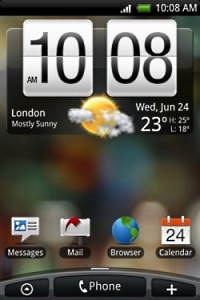
10. Nhiều khách hàng ở bở mặt chungHTC Android vởi giao diện Sense UI trên Hero và Eris, đó sẽ không là lần cuối cùn

g họ làm thế.
Chúng ta hoài nghi rằng sẽ thấy nhiều nhà sản xuất đặt Anroid cong duy nhất trên sản phẩm của họ trong năm 2010, nếu được ra đời từ đám đông. Với nhiều điện thoại ra đời, những nhà sản xuất có sự cách tân về phần cứng và tạo ra những giao diện đẹp đó là cách họ thu hút khách hàng.
Như đã quan tâm ở trên Sony Ericsson XPERIA X10.
Cuối cùngVới một vài tiên đón trên phần lớn sẽ diễn ra, trong khi những thứ khác vừa là hi vọng. Những gì diễn ra trong năm 2010 là những gì chúng ta đang quan tâm đến thiết bị di động. Microsoft cần đảm bảo ra đời Windows Mobile 7, và RIM cần xem lại những gì trên hành tinh họ đang làm...
Android đang là sự hấp dẫn nhất của tất cả.
Tham khảo (pingdom.com)


 g họ làm thế.


